Dependendo de como o T&E Express está configurado para cada empresa, os adiantamentos passam para o status "A reportar" automaticamente ou devem ser alterados manualmente.
Esta funcionalidade se aplica aos casos em que os adiantamentos são alterados para "A reportar" manualmente.
Adiantamento aprovado: assim que um adiantamento é aprovado pelo Financeiro/Tesouraria, um ícone aparece automaticamente no início da linha no histórico de adiantamentos. Por padrão, o ícone será cinza, indicando que está "Preparando fundos".
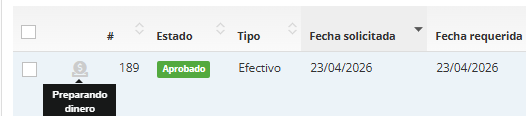
O status "Preparando fundos" só será visível para a equipe de Contabilidade.
Alterar para "Pendente de retirada": assim que o dinheiro estiver pronto para retirada, ao clicar no botão, o Financeiro/Tesouraria verá os seguintes status exibidos.
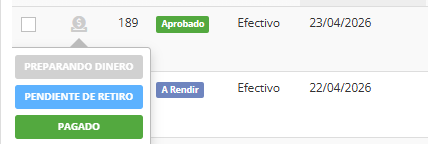
Ao selecionar "Pendente de retirada", será exibido um alerta de confirmação com a mensagem:
"Tem certeza de que deseja alterar o status? Sim/Não."

Ao confirmar, o ícone ficará azul. Ao mesmo tempo, o solicitante receberá uma notificação, tanto por e-mail quanto dentro do T&E Express, informando que o adiantamento solicitado já está pronto para retirada.
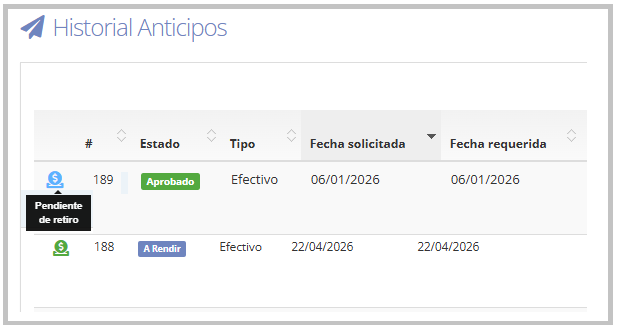
Este status é visível tanto para a equipe de Contabilidade quanto para o usuário solicitante e seus respectivos aprovadores funcionais.
Toda ação realizada no ícone, como a alteração para "Pendente de retirada", é registrada automaticamente no sistema, incluindo o nome do usuário que realizou a ação, a data e a hora. Isso mantém um histórico completo, garantindo rastreabilidade e controle sobre todas as ações realizadas.
Dessa forma, o controle dos adiantamentos se torna visual e simples, facilitando identificar rapidamente quais adiantamentos estão sendo preparados e quais já estão prontos para retirada.
Status Pago: assim que o adiantamento for efetivamente pago ao solicitante pelo Financeiro/Tesouraria, seu status deve ser atualizado para "Pago".
Ao selecionar esse status, será exibido um alerta de confirmação com a mensagem:
"Tem certeza de que deseja alterar o status? Sim/Não."

Ao confirmar, o ícone ficará verde, indicando que o adiantamento foi pago corretamente.
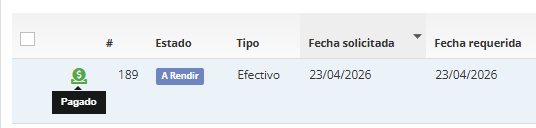
Este status é visível tanto para a equipe de Contabilidade quanto para o usuário solicitante e seus respectivos aprovadores funcionais.
Toda ação realizada no ícone, como a alteração para "Pago", é registrada automaticamente no sistema, incluindo o nome do usuário que realizou a ação, a data e a hora. Isso mantém um histórico completo, garantindo rastreabilidade e controle sobre todas as ações realizadas.
Dessa forma, todo o ciclo de vida do adiantamento é acompanhado, desde a solicitação até o pagamento.
É importante destacar que as alterações de status podem ser feitas quantas vezes forem necessárias.
É possível alterar para o status "A reportar" sem passar pelo ícone, portanto esta funcionalidade não impede que o Financeiro/Tesouraria continue operando sem restrições.
Para mais informações sobre como alterar um adiantamento para o status "A reportar", consulte o seguinte guia: Alterar o status dos adiantamentos para "A reportar".