Dependendo de como o T&E Express está configurado para cada empresa, os relatórios de despesas passam para o status "Fechado" automaticamente ou devem ser alterados manualmente.
Veja abaixo como fazer isso manualmente.
O usuário Financeiro ou Tesouraria é responsável por alterar o status dos relatórios de despesas aprovados para "Fechado".
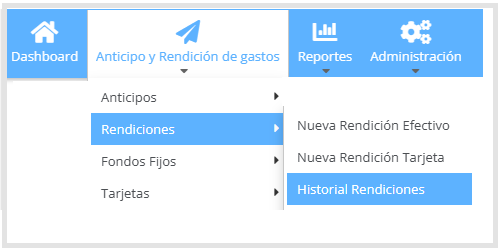
Alterar status para Fechado: acesse Adiantamentos e Relatórios de Despesas > Relatório de despesas > Histórico Relatórios, como mostrado na imagem a seguir.
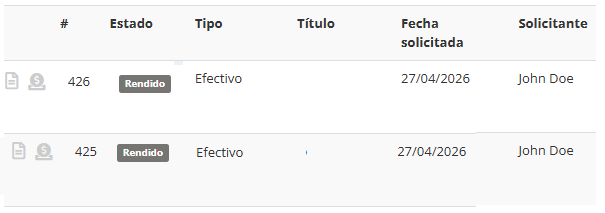
Os relatórios de despesas são exibidos em formato de lista, indicando seu status atual, como mostrado abaixo.
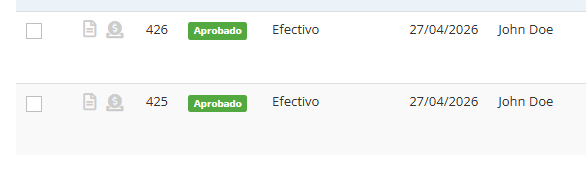
Ícone de status de pagamento: para relatórios de despesas que estão no status Aprovado e possuem valores reembolsáveis, será exibido um ícone no início da linha refletindo o status de preparação do pagamento. Esse ícone tem três estados possíveis:
Cinza — "Preparando fundos": este é o status inicial. Indica que o pagamento ainda está sendo preparado. Este status só é visível para a equipe de Financeiro/Contabilidade.
Azul — "Pendente de retirada": indica que o dinheiro está pronto para ser retirado; o solicitante recebe uma notificação com esse status.
Verde — "Pago": indica que o pagamento foi realizado e confirmado.
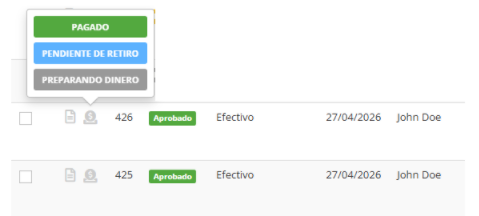
O uso desse ícone é opcional e informativo. Não é um requisito para alterar o status do relatório de despesas para Fechado. O Financeiro ou a Tesouraria pode realizar a alteração independentemente do status do ícone.
Para alterar para o status Fechado, selecione o(s) relatório(s) de despesas no status Aprovado e marque a caixa correspondente.
Na parte inferior da tela, é exibida uma lista dos relatórios de despesas selecionados, junto com um botão para alterar o status para Fechado, como mostrado na imagem a seguir:
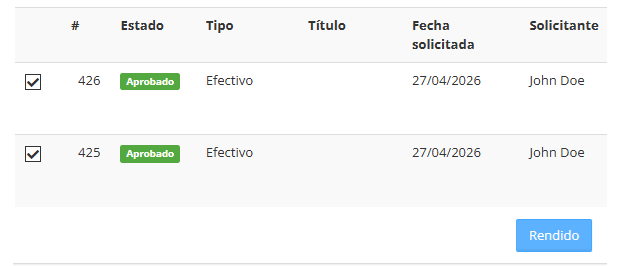
Depois de marcado como Fechado, o status não pode mais ser modificado. Essa alteração fica registrada no histórico do relatório de despesas, como mostrado na imagem a seguir:
Observação: se houver um relatório de despesas de cartão que tenha uma retirada de dinheiro associada e ainda tenha saldo pendente no relatório de despesas em dinheiro, ele não passará para o status "Fechado". Quando os relatórios de despesas passam para o status "Fechado", os adiantamentos associados a eles também passam para esse status, desde que não tenham saldo positivo.