
Every time you have a cash advance or an expense report to approve, T&E Express sends you an email with all the key information about the request. That way, as soon as you open it, you know who it’s from, how much it’s for, and what it includes, so you can prioritize what’s urgent and log in to the system knowing exactly what you’re going to review.
Cash advances to approve
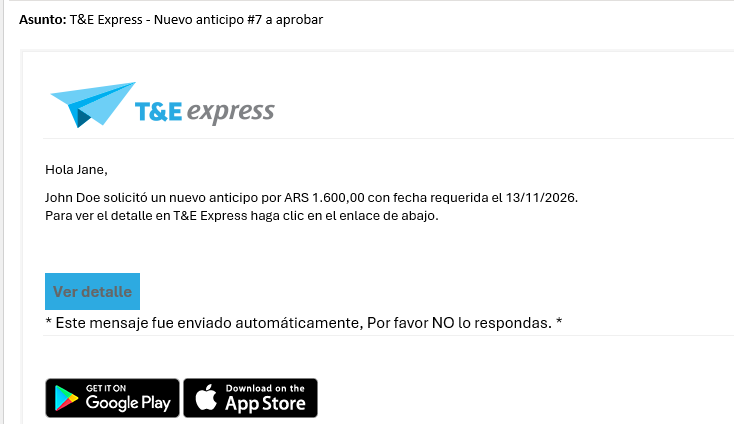
When a user requests a cash advance and it’s your turn to approve it, the email shows you:
who requested it
the amount and currency
the date the money is needed
Also, the cash advance number appears in the subject line, so you can spot it at a glance in your inbox.
Expense reports to approve
When a user submits an expense report and it’s your turn to approve it, the email shows you:
who submitted it
the balance to be reimbursed, that is, the amount the company has to pay back to the user for their expenses
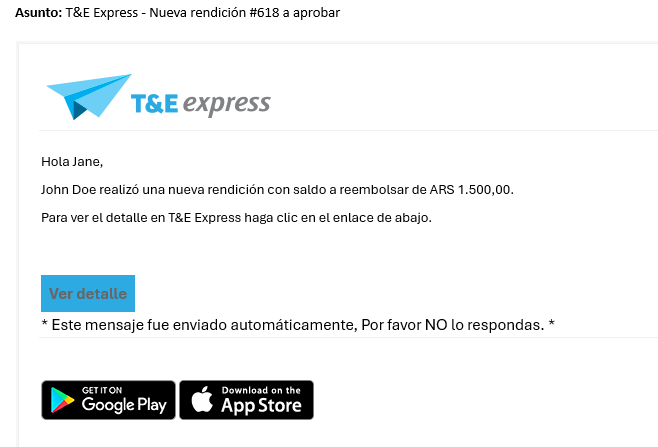
And if the expense report includes a refund of cash advance surplus, you’ll also see it in the email.
Need to see more?
Click “View details” at the bottom of the email to go straight to the request in T&E Express, where you can review all the information and approve it.
These emails are sent to everyone involved in the approval workflow, from the functional approver to Finance.