
In this section you can create cash advance requests by filling in the required information.
Request Cash Advance: To request a cash advance, go to Cash Advance and Expense Report > Cash Advances > Request cash advance.
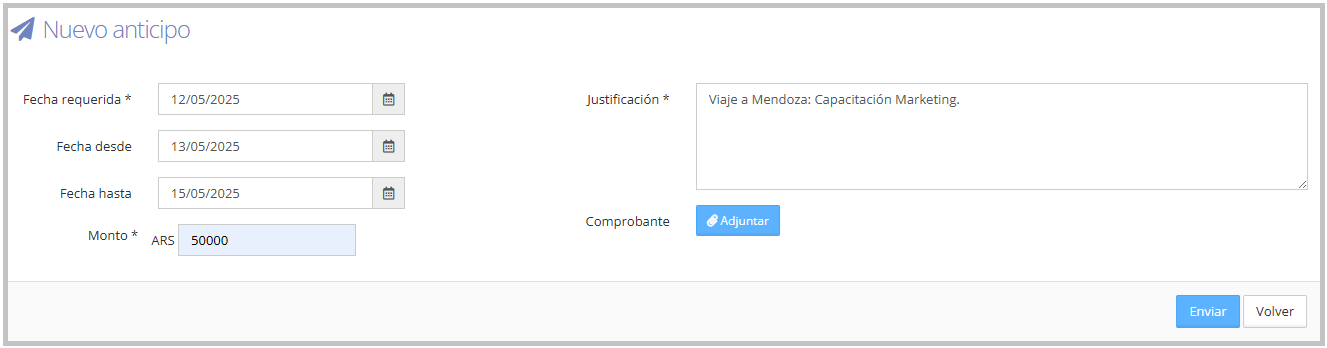
Fill in the required fields, marked with (*): required date (the day you need the funds), amount, and justification.
If the cash advance is for a trip, you must also fill in the start date and end date fields.
As shown in the image below:
Additionally, from Cash Advance and Expense Report > Cash Advances > Cash Advance History, you can check your submitted cash advances and their status.
To track your submitted cash advances, you can access the following guide: Cash Advance History.
To learn about the different status types, refer to the Cash Advance Statuses guide.
Notifications: A notification will be sent to the approver requesting their approval. T&E Express will send an email every time the cash advance changes status.
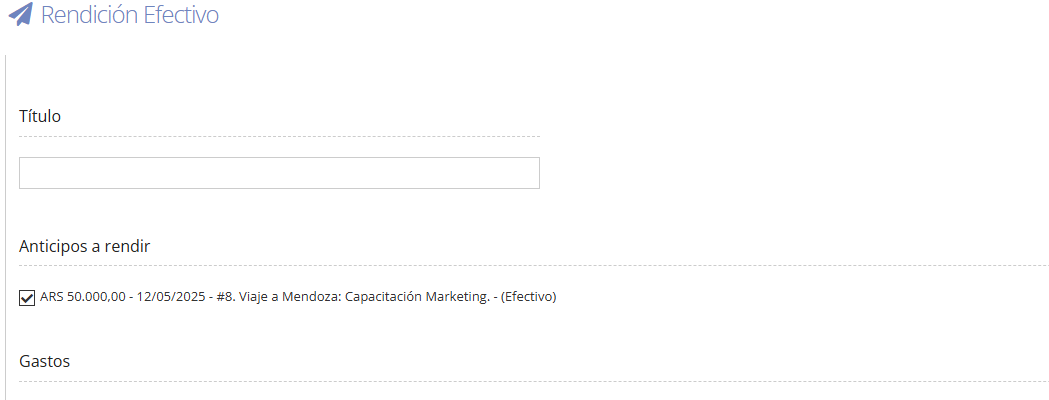
Settle Cash Advance: Once the cash advance status is 'To report', you will be able to report it in an expense report. It will be listed under the 'Cash advances to report' section. You must select the checkbox, as shown in the image below:
Below you will find the following Cash Advance Request video.